API Keys
Learn how to find, manage, and securely use your Hands In API keys to authenticate requests
Get Markdown🔑 API Keys
Hands In uses API keys to authenticate all API requests. This guide walks you through how to locate your API keys, use them to authorize API calls, and follow security best practices.
1️⃣ Finding Your API Keys
To retrieve your API keys:
- Log in to the Hands In merchant dashboard.
- Navigate to Developers > API Keys.
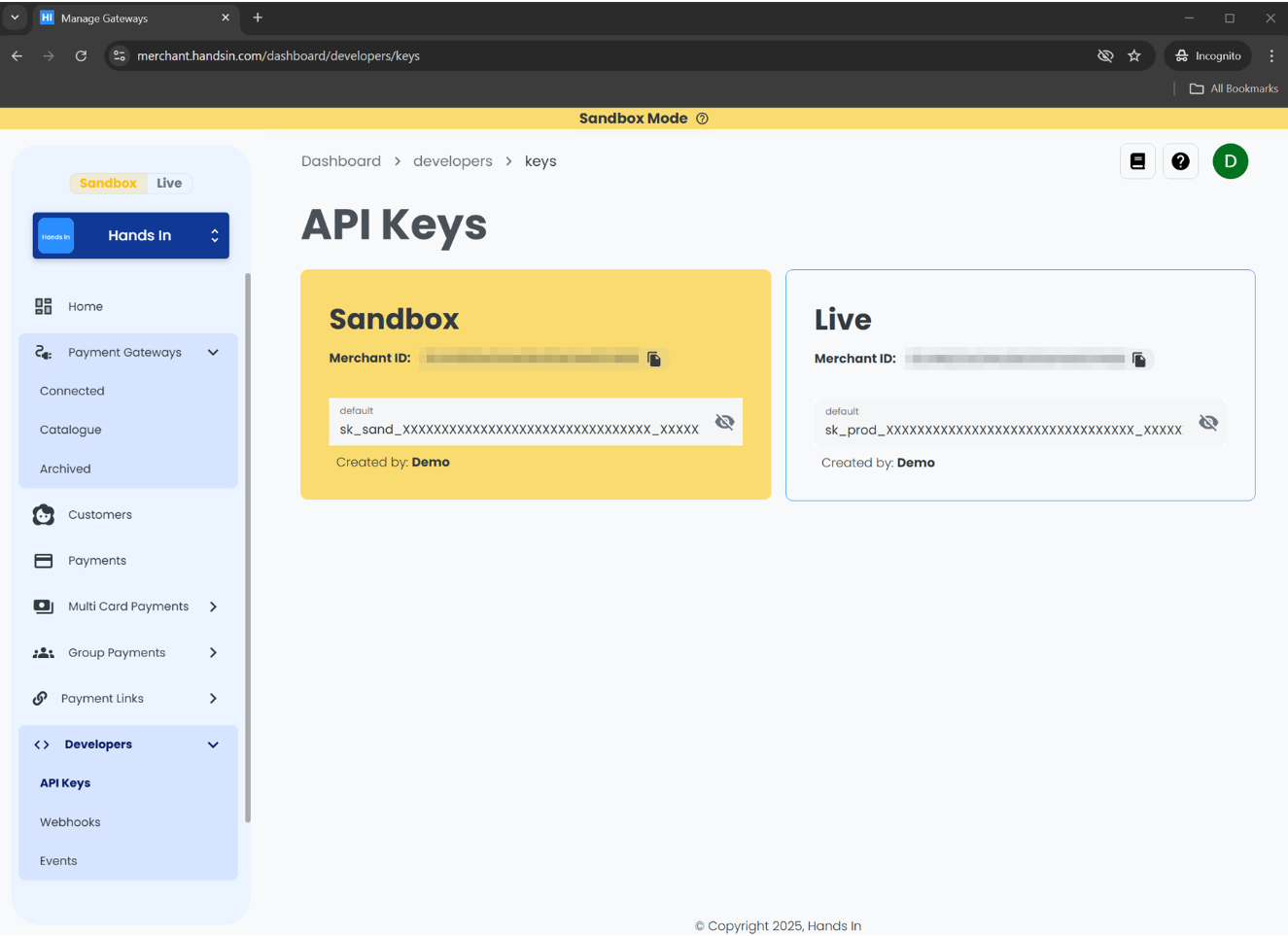
- You’ll see two keys:
- Sandbox API Key – for testing requests against the sandbox environment
- Live API Key – for processing real transactions in production
Each key is a long alphanumeric string. For security, they may be partially masked — click "Reveal" to view the full value.
Be sure to copy the correct key for the environment you're working in.
A sandbox key used on the live API (or vice versa) will result in an authentication error.
2️⃣ Using API Keys in Requests
Include your API key in the x-api-key header for every API request.
curl --request POST \
  --url https://api.sandbox.handsin.com/v1/multi-card-payments \
  --header "Accept: application/json" \
  --header "Content-Type: application/json" \
  --header "x-api-key: <your-api-key>" \
  --data '{
    "amountMoney": {
      "currency": "GBP",
      "amount": 50000
    },
    "idempotencyKey": "<unique-random-string>"
  }'
const url = "https://api.sandbox.handsin.com/v1/multi-card-payments";
const payload = {
amountMoney: {
currency: "GBP",
amount: 50000
},
idempotencyKey: "<unique-random-string>"
};
try {
const response = await fetch(url, {
method: "POST",
headers: {
"Accept": "application/json",
"Content-Type": "application/json",
"x-api-key": "<your-api-key>"
},
body: JSON.stringify(payload)
});
if (!response.ok) {
throw new Error(`Response status: ${response.status}`);
}
const data = await response.json();
console.log(data);
} catch (error) {
console.error("Request failed:", error.message);
}import requests
url = "https://api.sandbox.handsin.com/v1/multi-card-payments"
headers = {
"Accept": "application/json",
"Content-Type": "application/json",
"x-api-key": "<your-api-key>"
}
payload = {
"amountMoney": {
"currency": "GBP",
"amount": 50000
},
"idempotencyKey": "<unique-random-string>"
}
try:
response = requests.post(url, headers=headers, json=payload)
response.raise_for_status()
print(response.json())
except requests.exceptions.RequestException as e:
print(f"Request failed: {e}")$headers = @{
"Accept" = "application/json"
"Content-Type" = "application/json"
"x-api-key" = "<your-api-key>"
}
$body = @{
amountMoney = @{
currency = "GBP"
amount = 50000
}
idempotencyKey = "<unique-random-string>"
} | ConvertTo-Json -Depth 3
try {
$response = Invoke-RestMethod -Uri "https://api.sandbox.handsin.com/v1/multi-card-payments"
-Method POST -Headers $headers -Body $body
$response
} catch {
Write-Host "Request failed: $($_.Exception.Message)"
}Replace <your-api-key> with your actual sandbox or live key depending on the target environment.
🔐 API Key Best Practices
Follow these security guidelines to protect your API keys and your customers:
- Keep them secret: Never share your API keys or expose them in frontend code.
- Use environment variables: Avoid hardcoding keys in source files or committing them to version control.
- Regenerate if compromised: If a key is exposed or leaked, revoke it immediately and generate a new one.
- Use the right key for the right environment: Sandbox and live keys are not interchangeable.
⚠️ Troubleshooting Key Errors
If you receive a 401 Unauthorized or 403 Forbidden response:
- Ensure you're using the correct API key for the environment.
- Double-check that the
x-api-keyheader is included and spelled correctly. - Confirm the merchant key hasn't been deleted or disabled.