# Reconcile Multi Card Payments (/docs/guides/multi-card/multi-card-reconcilation)
# 📊 Reconcile a Multi Card Session [#-reconcile-a-multi-card-session]
When a customer splits a transaction across multiple cards, each payment has its own individual `referenceId` field.
Hands In helps you track and reconcile these payments via your systems using a custom `referenceId` field.
By Default, any `payment` made into a `multi card` payment session will have the following format:
```
{multiCardId}_{paymentIndex}
```
Where:
* `multiCardId` is the `id` of the multi card payment session
* `paymentIndex` indicates which transaction in the session the payment is associated with. For example, if a customer uses two cards, the payments will be labeled with paymentIndex values 1 and 2, corresponding to the first and second card transactions.
## 🧾 Using `referenceId` for Multi Card Payments [#-using-referenceid-for-multi-card-payments]
When creating a multi card session, you can pass a `referenceId` field in the request. As a result **each individual card payment** will have the `referenceId` you passed instead of the `multiCardId` referenced in the default format, making reconciliation possible with your systems.
### Example Create Request with `referenceId` [#example-create-request-with-referenceid]
```bash
curl --request POST \
--url https://api.sandbox.handsin.com/v1/multi-card-payments \
--header "Accept: application/json" \
--header "Content-Type: application/json" \
--header "x-api-key: " \
--data '{
"idempotencyKey": "example_unique_idempotency_key",
"referenceId": "YOUR_UNIQUE_MERCHANT_ORDER_REF",
"amountMoney": {
"amount": 1000,
"currency": "GBP"
},
"customer": {
"firstName": "Example",
"lastName": "Customer",
"email": "example@handsin.com",
"phoneNumber": "+447232323",
"language": "en"
}
}'
```
```javascript
const url = "https://api.sandbox.handsin.com/v1/multi-card-payments";
const payload = {
idempotencyKey: "example_unique_idempotency_key",
referenceId: "YOUR_UNIQUE_MERCHANT_ORDER_REF",
amountMoney: {
amount: 1000,
currency: "GBP",
},
customer: {
firstName: "Example",
lastName: "Customer",
email: "example@handsin.com",
phoneNumber: "+447232323",
language: "en",
},
};
try {
const response = await fetch(url, {
method: "POST",
headers: {
Accept: "application/json",
"Content-Type": "application/json",
"x-api-key": "",
},
body: JSON.stringify(payload),
});
if (!response.ok) {
throw new Error(`Response status: ${response.status}`);
}
const data = await response.json();
console.log(data);
} catch (error) {
console.error("Request failed:", error.message);
}
```
```python
import requests
url = "https://api.sandbox.handsin.com/v1/multi-card-payments"
headers = {
"Accept": "application/json",
"Content-Type": "application/json",
"x-api-key": ""
}
payload = {
"idempotencyKey": "example_unique_idempotency_key",
"referenceId": "YOUR_UNIQUE_MERCHANT_ORDER_REF",
"amountMoney": {
"amount": 1000,
"currency": "GBP"
},
"customer": {
"firstName": "Example",
"lastName": "Customer",
"email": "example@handsin.com",
"phoneNumber": "+447232323",
"language": "en"
}
}
try:
response = requests.post(url, headers=headers, json=payload)
response.raise_for_status()
print(response.json())
except requests.exceptions.RequestException as e:
print(f"Request failed: {e}")
```
```powershell
$headers = @{
"Accept" = "application/json"
"Content-Type" = "application/json"
"x-api-key" = ""
}
$body = @{
idempotencyKey = "example_unique_idempotency_key"
referenceId = "YOUR_UNIQUE_MERCHANT_ORDER_REF"
amountMoney = @{
amount = 1000
currency = "GBP"
}
customer = @{
firstName = "Example"
lastName = "Customer"
email = "example@handsin.com"
phoneNumber = "+447232323"
language = "en"
}
} | ConvertTo-Json -Depth 3
try {
$response = Invoke-RestMethod -Uri "https://api.sandbox.handsin.com/v1/multi-card-payments" `
-Method POST -Headers $headers -Body $body
$response
} catch {
Write-Host "Request failed: $($_.Exception.Message)"
}
```
Now any `payments` made into this multi card payment session, will have the following `referenceId` - `YOUR_UNIQUE_MERCHANT_ORDER_REF_{paymentIndex}`
where `YOUR_UNIQUE_MERCHANT_ORDER_REF` is the value you passed in to the create multi card request above and `paymentIndex` we append automatically
## 🔍 Look Up Payments Via Your Merchant Dashboard [#-look-up-payments-via-your-merchant-dashboard]
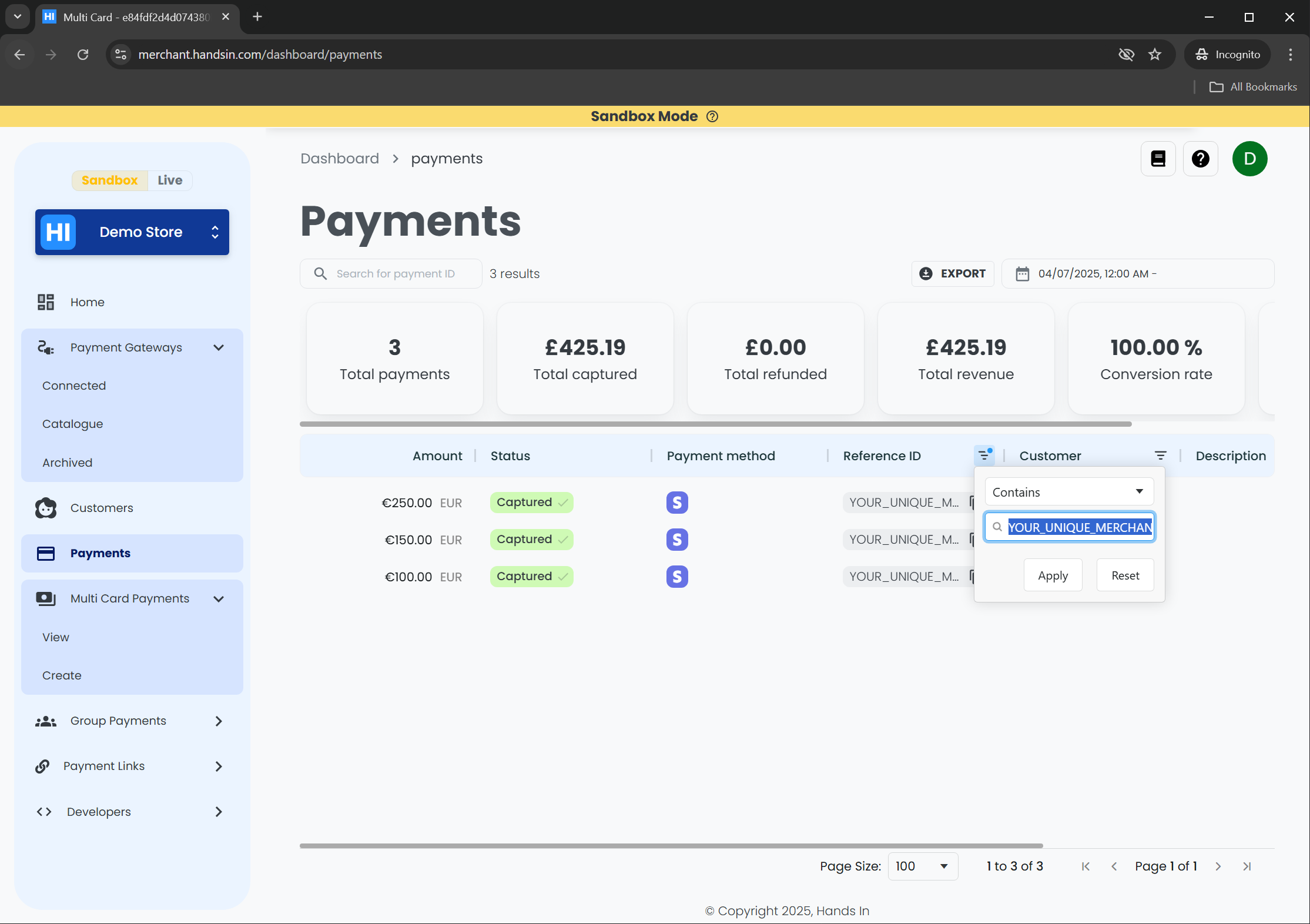 Using the table column 'reference Id' - You can search and filter your payments by your system's referenceId directly from your [Hands In Payments Dashboard](https://merchant.handsin.com/dashboard/payments)
In the example above, 3 payments out of many payments were found, with the following referenceIds:
| Card # | Example Reference ID |
| ------ | ------------------------------------- |
| 1 | YOUR\_UNIQUE\_MERCHANT\_ORDER\_REF\_1 |
| 2 | YOUR\_UNIQUE\_MERCHANT\_ORDER\_REF\_2 |
| 3 | YOUR\_UNIQUE\_MERCHANT\_ORDER\_REF\_3 |
***
✅ That's it — you've learned how to use `referenceId` to help reconcile payments from a multi card session using your dashboard.
➡️ For real-time reconciliation and tracking of events, we recommend setting up [webhook notifications](/docs/guides/multi-card/multi-card-webhooks) to receive updates as they happen.\
Alternatively, API Integrations can poll the multi card payment session and fetch each payment for that session using the `paymentIds` field and in conjunction with the [retrieve payment endpoint](/docs/API/v1/getPayment)
Using the table column 'reference Id' - You can search and filter your payments by your system's referenceId directly from your [Hands In Payments Dashboard](https://merchant.handsin.com/dashboard/payments)
In the example above, 3 payments out of many payments were found, with the following referenceIds:
| Card # | Example Reference ID |
| ------ | ------------------------------------- |
| 1 | YOUR\_UNIQUE\_MERCHANT\_ORDER\_REF\_1 |
| 2 | YOUR\_UNIQUE\_MERCHANT\_ORDER\_REF\_2 |
| 3 | YOUR\_UNIQUE\_MERCHANT\_ORDER\_REF\_3 |
***
✅ That's it — you've learned how to use `referenceId` to help reconcile payments from a multi card session using your dashboard.
➡️ For real-time reconciliation and tracking of events, we recommend setting up [webhook notifications](/docs/guides/multi-card/multi-card-webhooks) to receive updates as they happen.\
Alternatively, API Integrations can poll the multi card payment session and fetch each payment for that session using the `paymentIds` field and in conjunction with the [retrieve payment endpoint](/docs/API/v1/getPayment)