# Multi Card Integration (/docs/guides/integration/multi-card-integration)
**Pre-requisites**
* [Setup your Hands In account](/docs/guides/getting-started/setup-your-account) - You must have created and set up a Hands In account before following this tutorial
* [API Authentication](/docs/guides/authentication/authentication-overview) - You must have retrieved your sandbox or live API key
**How it works**
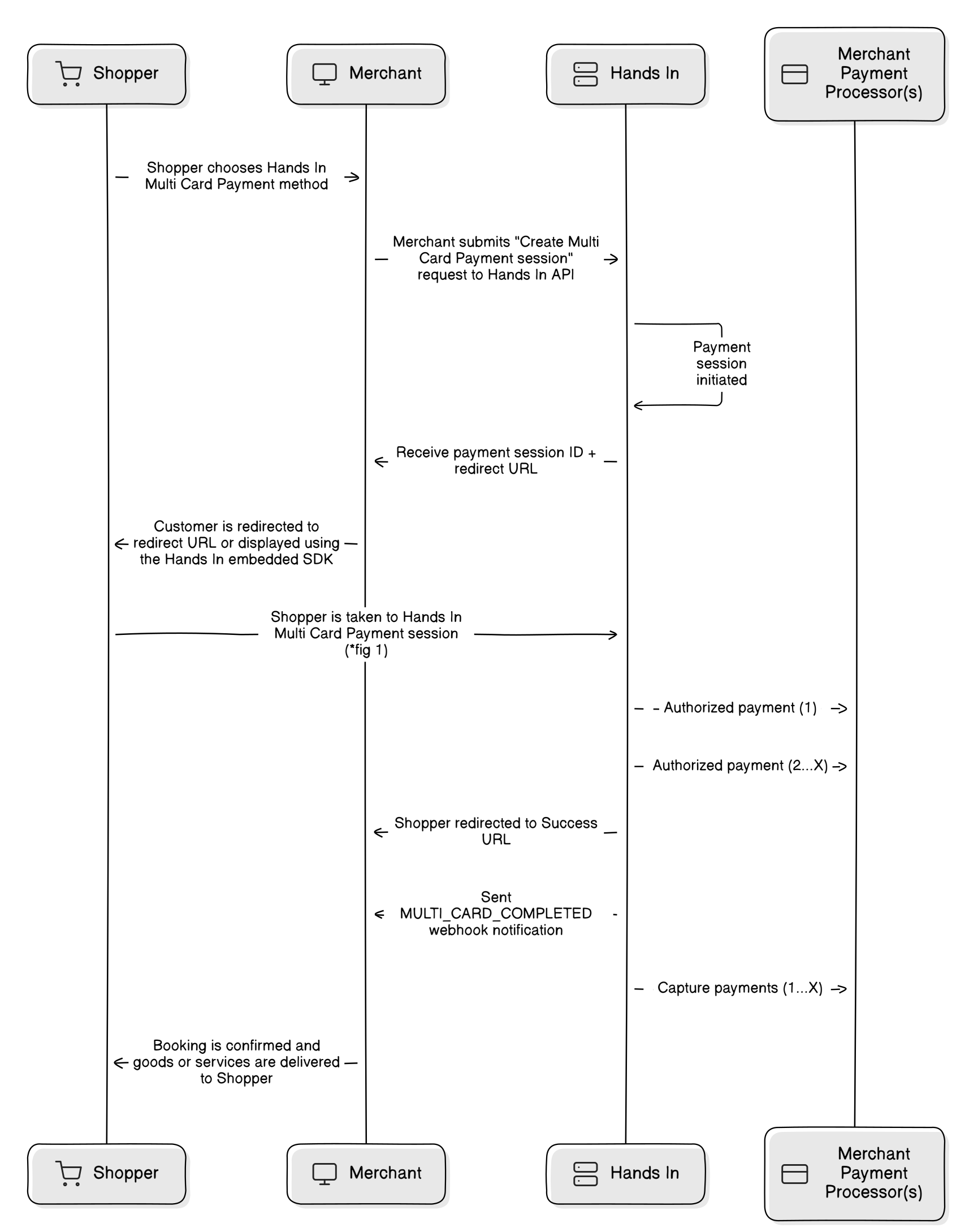
Basic Server-Server flow for accepting Multi Card Payments
**Server-to-server integration steps**
1. **Create a multi card payment session** — `POST /v1/multi-card-payments` with the total in `amountMoney`, a unique `idempotencyKey`, and
optionally your own `referenceId`. See
[Create a Multi Card Payment Session](/docs/guides/multi-card/multi-card-payment-sessions/create-a-multi-card-payment-session) for full request and
response examples.
2. **Send the customer to the hosted checkout** — take the `url` from the response and redirect the customer, open it in a new tab, embed it in an
`