# Subscribe to Group Payment Webhooks (/docs/guides/group-payment/group-payment-webhooks)
# 🤝 Group Payment Webhook Events [#-group-payment-webhook-events]
Hands In supports a real-time webhook notification system so your system can stay in sync with payment activity. You can subscribe to a set of webhook events to receive updates when key actions occur within a session.
***
## 🛠️ Setting Up a Webhook [#️-setting-up-a-webhook]
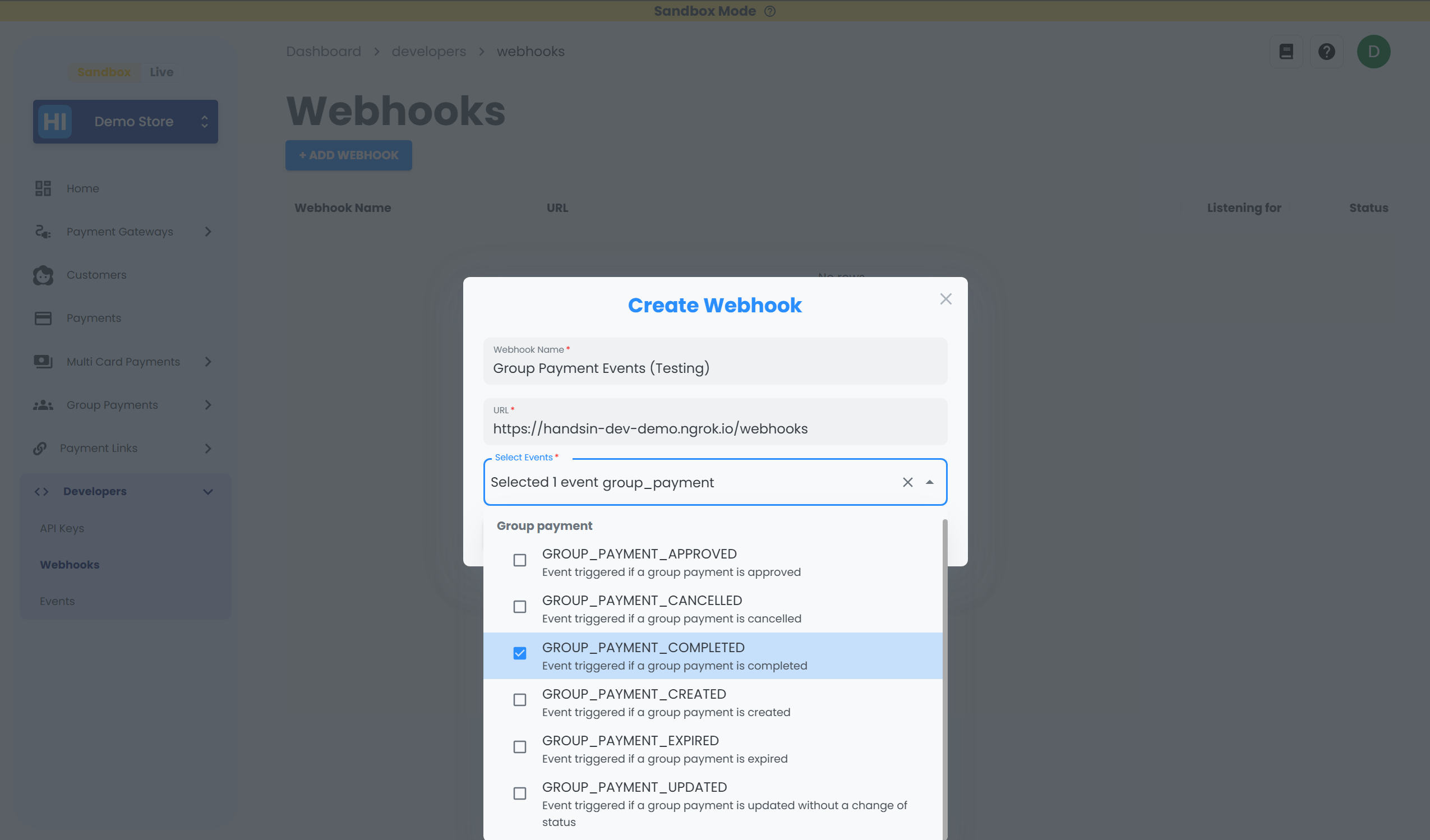 To add a webhook:
1. Log in to your [**Hands In Merchant Dashboard**](https://merchant.handsin.com).
2. Navigate to Developers > [**Webhooks**](https://merchant.handsin.com/dashboard/developers/webhooks)
3. Click **Add Webhook**.
4. Provide the following:
* A webhook **name**
* A **URL** where you wish to receive `POST `requests. (must be HTTPS - can use tunnel services like [**ngrok**](https://ngrok.com/) for development/testing )
* Lastly, select the **group payment events** you wish to subscribe to from the dropdown list
**Note:** Before going live, you will need to register webhooks for both sandbox and live environments separately.
## 📋 Group Payment Webhook Event Types [#-group-payment-webhook-event-types]
Use the dropdown during webhook setup to subscribe to any of the following events:
| Event Type | Description |
| ------------------------- | ---------------------------------------------- |
| `GROUP_PAYMENT_CREATED` | A new group payment session was created. |
| `GROUP_PAYMENT_UPDATED` | An existing group payment session was updated. |
| `GROUP_PAYMENT_APPROVED` | The group payment session was approved. |
| `GROUP_PAYMENT_COMPLETED` | The group payment session was completed. |
| `GROUP_PAYMENT_EXPIRED` | The group payment session has expired. |
| `GROUP_PAYMENT_CANCELLED` | The group payment session was cancelled. |
For a full list of events across the platform, see [Webhook Event Reference](/docs/webhooks/webhooks-events) for more details.
## 📦 Group Payment Example Webhook Payload [#-group-payment-example-webhook-payload]
When an event is triggered, Hands In sends a `POST` request to your webhook URL with the following payload:
```json
{
"id": "eventId",
"eventType": "GROUP_PAYMENT_CREATED",
"merchantId": "merchant_456",
"createdAt": "2025-05-06T12:00:00Z",
"groupPaymentId": "groupPayment_712",
"data": {
// ... event-specific object (e.g., group payment session)
}
}
```
You can then perform your business logic accordingly based on the `eventType`.
For example, when you receive `GROUP_PAYMENT_COMPLETED`, you might want to email all the paid customers from your system with the necessary information.
***
To add a webhook:
1. Log in to your [**Hands In Merchant Dashboard**](https://merchant.handsin.com).
2. Navigate to Developers > [**Webhooks**](https://merchant.handsin.com/dashboard/developers/webhooks)
3. Click **Add Webhook**.
4. Provide the following:
* A webhook **name**
* A **URL** where you wish to receive `POST `requests. (must be HTTPS - can use tunnel services like [**ngrok**](https://ngrok.com/) for development/testing )
* Lastly, select the **group payment events** you wish to subscribe to from the dropdown list
**Note:** Before going live, you will need to register webhooks for both sandbox and live environments separately.
## 📋 Group Payment Webhook Event Types [#-group-payment-webhook-event-types]
Use the dropdown during webhook setup to subscribe to any of the following events:
| Event Type | Description |
| ------------------------- | ---------------------------------------------- |
| `GROUP_PAYMENT_CREATED` | A new group payment session was created. |
| `GROUP_PAYMENT_UPDATED` | An existing group payment session was updated. |
| `GROUP_PAYMENT_APPROVED` | The group payment session was approved. |
| `GROUP_PAYMENT_COMPLETED` | The group payment session was completed. |
| `GROUP_PAYMENT_EXPIRED` | The group payment session has expired. |
| `GROUP_PAYMENT_CANCELLED` | The group payment session was cancelled. |
For a full list of events across the platform, see [Webhook Event Reference](/docs/webhooks/webhooks-events) for more details.
## 📦 Group Payment Example Webhook Payload [#-group-payment-example-webhook-payload]
When an event is triggered, Hands In sends a `POST` request to your webhook URL with the following payload:
```json
{
"id": "eventId",
"eventType": "GROUP_PAYMENT_CREATED",
"merchantId": "merchant_456",
"createdAt": "2025-05-06T12:00:00Z",
"groupPaymentId": "groupPayment_712",
"data": {
// ... event-specific object (e.g., group payment session)
}
}
```
You can then perform your business logic accordingly based on the `eventType`.
For example, when you receive `GROUP_PAYMENT_COMPLETED`, you might want to email all the paid customers from your system with the necessary information.
***